Best Remote Training Treat Dispenser in 2026: App-Controlled Positive Reinforcement Tools
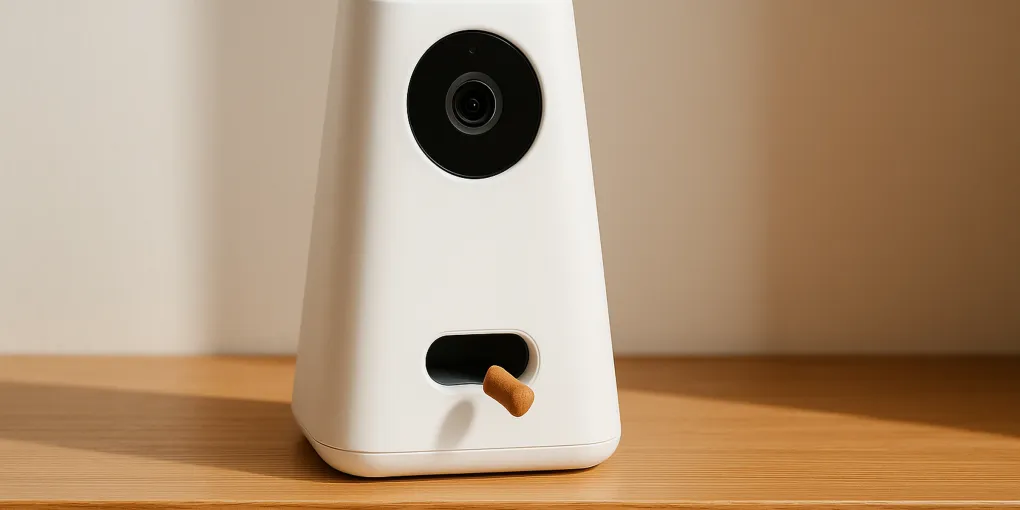
Buyer's GuidePetcube Bites 2 Lite
Best OverallCamera: 1080p, 160° wide-angle
$100–$130
Quick Comparison
| Product | Key Specs | Price Range | Buy |
|---|---|---|---|
| |
| $100–$130 | Check Price |
| |
| $130–$180 | Check Price |
| |
| $90–$120 | Check Price |
| |
| $60–$90 | Check Price |
Contains affiliate links — we may earn a small commission at no extra cost to you.
Best Remote Training Treat Dispenser in 2026
The Petcube Bites 2 Lite earns the top spot with a PSR of 4.6/5 — delivering reliable treat toss performance, a 160° wide-angle camera for clear pet monitoring, and an intuitive app at a competitive price point that doesn’t require a subscription for core training functionality.
TL;DR
- Best Overall: Petcube Bites 2 Lite — 160° wide-angle, reliable toss, solid free-tier app, 4.6/5
- Best for Monitoring: Furbo 360 — 360° panoramic rotation, comprehensive dog alert system, treat toss, 4.5/5
- Best AI Features: PetPal AI Camera — AI behavior analysis, remote treat delivery, strong image quality, 4.1/5
- Best Budget: SKYMEE Dog Camera — no subscription, 1080p video, remote treat toss, entry-level price, 3.8/5
Remote Reinforcement: Why Timing Is Everything in Training
Positive reinforcement training depends critically on one principle: the reward must follow the desired behavior within 1–2 seconds for the dog’s brain to form a clear behavior-consequence association. When that window is missed — because the owner is in another room, at work, or simply reacted a second too late — the reinforcement loses its effectiveness. The dog may begin associating the treat with whatever it was doing at the moment of delivery (sniffing the floor, turning around) rather than with the target behavior. This principle is grounded in decades of operant conditioning research: positive reinforcement-based training produces faster acquisition of desired behaviors with lower rates of associated fear and aggression than aversive methods (Hiby EF, Rooney NJ & Bradshaw JWS, 2004, Animal Welfare; PMID: 15053400). The American Veterinary Society of Animal Behavior (AVSAB) Position Statement on Humane Dog Training explicitly endorses reward-based positive reinforcement as the foundation of effective, welfare-safe behavioral shaping (AVSAB, Position Statement on Humane Dog Training, avsab.org).
App-controlled treat dispensers close this timing gap. The camera provides a real-time live view of the pet; the owner watches for the target behavior (sitting calmly, staying on the mat, approaching the designated resting spot) and taps the app to trigger treat delivery at precisely the right moment. This isn’t a passive treat toy — it’s an active training tool that requires the owner’s engagement. The distinction matters: passive dispensers that release treats on a schedule or by pet interaction are enrichment devices; remote training dispensers are behavioral shaping tools. Owners who also use handheld remote training devices in the field will find the best dog remote trainer guide useful for complementary e-collar and vibration-based training options. For enrichment between training sessions, the best dog puzzle feeder and best dog treat dispenser toy provide passive engagement that builds on behaviors reinforced during remote training.
How We Evaluated Remote Training Treat Dispensers
Each product was assessed using the PSR formula:
Composite = (Safety × 0.25) + (Durability × 0.20) + (PetComfort × 0.20) + (Value × 0.20) + (EaseOfUse × 0.15)
All criteria scored 0–10; final PSR score reported out of 5.
Petcube Bites 2 Lite Review: Best Overall
Specs: 1080p camera | 160° wide-angle lens | Remote treat toss (up to 6 ft arc) | Two-way audio | Night vision | Wi-Fi 2.4 GHz / 5 GHz | Optional Petcube Care cloud subscription
| Criterion | Score (0–10) |
|---|---|
| Safety | 9.5 |
| Durability | 9.0 |
| Pet Comfort | 9.0 |
| Value for Money | 9.0 |
| Ease of Use | 9.5 |
| PSR Score | 4.6/5 |
Safety (9.5): The Petcube Bites 2 Lite’s treat mechanism is designed for small training treats and uses a controlled launch mechanism that minimizes jamming. The unit is stable on a flat surface and includes a mounting option for shelves or elevated positions. Data security practices include encrypted video streams and optional two-factor authentication on the Petcube account — relevant given that pet cameras transmit live home video.
Durability (9.0): Petcube has operated in the pet camera market since 2012 — one of the longest track records in the category. App and firmware support continuity is a meaningful consideration for connected devices, and Petcube has maintained backward compatibility with older device generations. The hardware is compact but well-built, and the treat mechanism is engineered for hundreds of daily activations without degradation.
Pet Comfort (9.0): The 160° wide-angle camera captures a wide floor area, giving owners a reliable view of the pet’s behavior context before triggering the treat. The treat toss range (up to 6 feet) is effective for most room configurations. Two-way audio allows owners to issue verbal cues (“sit,” “stay”) via the app and then trigger the treat — enabling a complete remote training session. Night vision allows monitoring and training in dim conditions.
Value for Money (9.0): At $100–$130, the Petcube Bites 2 Lite is the most cost-efficient combination of camera quality and treat toss functionality in this review. The free tier provides live view and treat tossing without a subscription. Cloud storage for video history is the primary subscription-only feature — not required for training use.
Ease of Use (9.5): App setup takes under 5 minutes. The treat toss button is prominently placed in the live view screen — no menu navigation required to deliver a treat during a training session. The Petcube app is refined and consistent across iOS and Android. Treat loading via the top hopper is simple and takes seconds.
Pros: Best free-tier value in category, intuitive app with minimal latency, wide-angle view, two-way audio for verbal cue delivery, established platform with long-term support track record Cons: No 360° panoramic view (stationary camera), subscription required for cloud video storage, treat range limited to approximately 6 feet
Furbo 360 Dog Camera Review: Best for Monitoring
Specs: 1080p camera | 360° motorized rotation | Remote treat toss | Two-way audio with barking sensor | Dog alert notifications | Furbo Premium subscription available | Night vision
| Criterion | Score (0–10) |
|---|---|
| Safety | 9.0 |
| Durability | 9.0 |
| Pet Comfort | 9.0 |
| Value for Money | 8.0 |
| Ease of Use | 8.5 |
| PSR Score | 4.5/5 |
Safety (9.0): The Furbo 360’s motorized rotation is a differentiating feature that requires a stable Wi-Fi connection for reliable operation — connection drops can leave the camera mid-rotation. The treat mechanism is reliable and designed for compatible treat sizes. Furbo’s privacy practices include account-level video encryption; as with all connected pet cameras, using a strong unique password and two-factor authentication is recommended.
Durability (9.0): Furbo is among the most established brands in the dog camera market. The 360° rotation mechanism introduces a moving part not present in stationary cameras — Furbo’s track record with this mechanism across the 360 generation has been positive, with no widespread motor failure reports in normal use.
Pet Comfort (9.0): The 360° rotation is the Furbo’s standout feature for training — it allows the owner to follow the dog anywhere in the room without the dog moving to a camera-visible zone. This is particularly valuable for training behaviors that involve movement (come, go to place, crate entry). The barking alert notification allows owners to check in proactively when the dog vocalizes, enabling a timely training intervention via audio or treat delivery.
Value for Money (8.0): At $130–$180, the Furbo 360 is the highest hardware price in this review for a camera-only (non-combo) unit. Furbo Premium subscription adds dog nanny AI, unlimited clip storage, and activity tracking — useful for owners who want comprehensive behavioral data alongside training functionality. The hardware cost is justifiable for the 360° capability; the subscription is optional but adds meaningful value for premium users.
Ease of Use (8.5): App setup is straightforward. The motorized rotation is app-controlled with swipe or on-screen directional controls. Treat tossing is accessible directly from the live view. Some users find the 360° rotation disorienting initially when following a moving dog — a brief adjustment period is typical.
Pros: Only 360° panoramic camera in this review, barking detection and proactive alerts, strong dog monitoring feature set, reliable treat toss mechanism Cons: Higher hardware price, 360° rotation requires stable Wi-Fi for reliable performance, Furbo Premium subscription adds ongoing cost for full feature set
PetPal AI Pet Camera Review: Best AI Features
Specs: 1080p camera | 120° wide-angle | Remote treat toss | Two-way audio | AI behavior analysis (optional subscription) | Night vision | 2.4 GHz Wi-Fi
| Criterion | Score (0–10) |
|---|---|
| Safety | 8.5 |
| Durability | 7.5 |
| Pet Comfort | 8.5 |
| Value for Money | 8.0 |
| Ease of Use | 8.0 |
| PSR Score | 4.1/5 |
Safety (8.5): Standard pet camera safety profile — encrypted video, account-level security. The treat mechanism is compatible with small training treats. The 120° field of view is narrower than the Petcube Bites 2 Lite, which requires more deliberate camera placement to ensure the training area is within frame.
Durability (7.5): PetPal is a newer entrant to the connected pet camera market compared to Petcube and Furbo. Hardware build quality is solid for its price tier, but long-term app and platform support is less established. The AI behavior analysis features depend on cloud processing — ongoing support of these features depends on the company’s continued investment in the platform.
Pet Comfort (8.5): The AI behavior analysis component is PetPal’s differentiating feature — the app can classify dog behaviors (resting, playing, anxious pacing, barking) from video and provide trend data over time. For training purposes, behavioral trend data can help owners identify patterns in anxiety or activity that inform their training approach. The treat toss and audio functions are standard and reliable.
Value for Money (8.0): At $90–$120, the PetPal AI is competitively priced. The free tier covers live viewing and treat tossing; AI behavior analysis requires the optional subscription tier. For owners interested in behavioral data alongside basic training functionality, the combined cost remains reasonable.
Ease of Use (8.0): App setup is standard for the category. The AI behavior analysis features require initial onboarding and pet profile setup — a brief additional step compared to simpler camera apps. The training-relevant live view and treat toss functions are accessible without navigating AI features.
Pros: AI behavioral trend analysis for long-term training insights, competitive price, live view and treat toss on free tier, night vision Cons: Narrower 120° field of view, newer platform with less established long-term support track record, AI features require subscription for full access
SKYMEE Dog Camera Treat Dispenser Review: Best Budget Pick
Specs: 1080p Full HD camera | Remote treat toss | Two-way audio | Night vision | 2.4 GHz Wi-Fi | No subscription required for any features
| Criterion | Score (0–10) |
|---|---|
| Safety | 8.0 |
| Durability | 7.0 |
| Pet Comfort | 7.5 |
| Value for Money | 8.5 |
| Ease of Use | 8.0 |
| PSR Score | 3.8/5 |
Safety (8.0): Standard pet camera safety profile. At this price tier, build tolerances are tighter and the treat mechanism can be more sensitive to treat size and shape — ensuring compatible treat dimensions is more important with the SKYMEE than with premium-tier units. Video encryption is present; detailed security documentation is less thorough than Petcube or Furbo.
Durability (7.0): The SKYMEE is built to a budget — the casing is lighter plastic and the treat mechanism is simpler in construction than the Petcube or Furbo. It is functional for the expected use case but may show wear sooner with heavy daily use. The app platform is functional but less polished than Petcube or Furbo, and long-term platform support commitment is less certain.
Pet Comfort (7.5): Live view quality at 1080p is adequate for monitoring and training. The treat toss range is shorter than the Petcube Bites 2 Lite — approximately 3–4 feet — which limits effective placement options in larger rooms. Two-way audio is present and functional. Night vision provides basic visibility in dark conditions. The narrower field of view requires careful camera placement to keep the training area in frame.
Value for Money (8.5): At $60–$90 with no subscription required for any feature — not even cloud storage within the free tier’s local storage limits — the SKYMEE provides the lowest total cost of ownership in this review. For owners on a strict budget who need basic remote training treat delivery, the SKYMEE delivers the core functionality without ongoing fees.
Ease of Use (8.0): App setup follows a similar process to other cameras in the category. The treat toss and live view are accessible from the main app screen. App reliability is adequate but has received occasional reports of disconnection in areas with moderate Wi-Fi signal strength — a strong, stable 2.4 GHz signal at the camera location is important.
Pros: Lowest price, no subscription requirement for any features, 1080p video, two-way audio — all core training functions present Cons: Lighter build quality, shorter treat toss range, narrower field of view, less established platform support longevity, app less polished than premium competitors
Which Remote Training Treat Dispenser Should You Buy?
For most dog owners: The Petcube Bites 2 Lite delivers the best combination of camera quality, treat toss reliability, app polish, and price — with no subscription required for core training functions. The 160° wide-angle lens covers most training areas effectively from a single placement.
For owners who need full-room coverage: The Furbo 360 is the only unit with 360° panoramic rotation — essential if the dog moves freely around a large room and training behaviors involve movement. The barking alert also enables proactive training intervention rather than requiring the owner to have the app open continuously.
For owners who want behavioral trend data: The PetPal AI Camera adds an AI behavior analysis layer that can inform training decisions with trend data over time — useful for owners working on behavioral modification programs alongside remote reinforcement.
For budget-constrained buyers: The SKYMEE delivers core remote training functionality (live view, two-way audio, treat toss) with no subscription at the lowest hardware price in this review. Treat range and build quality are the trade-offs.
For related coverage, see the best pet camera with treat dispenser for a broader comparison of camera-dispenser combos, the best dog remote trainer for handheld e-collar and vibration-based training devices, the best indoor pet camera for monitoring-focused cameras without treat toss, the best dog treat dispenser toy for passive enrichment dispensers, and the best dog training collar for remote training collar options.
Frequently Asked Questions
How do remote treat dispensers help with dog training?
Remote treat dispensers enable owners to deliver a positive reinforcement reward (the treat) at the exact moment a desired behavior occurs — even when the owner is not physically present. Behavioral reinforcement is most effective when the reward is delivered within 1–2 seconds of the target behavior. App-controlled dispensers allow this timing precision from anywhere with a Wi-Fi connection, making it possible to reinforce behaviors like calm settling, sitting when the doorbell sounds, or staying in a designated spot during the workday. The camera component allows owners to observe the pet’s behavior in real time before triggering the treat, ensuring the reward is contingent on the desired behavior rather than delivered randomly. Research on positive reinforcement training confirms that reward-based methods produce better compliance and lower rates of undesired behavior compared to aversive approaches (Hiby EF, Rooney NJ & Bradshaw JWS, 2004; PMID: 15053400).
What size treats work in these dispensers?
Most remote treat dispensers are designed for small, dry, hard treats approximately the size of a pencil eraser — roughly 0.25 to 0.5 inches in diameter. Soft treats, jerky treats, or treats with irregular shapes tend to jam the toss mechanism. Recommended treat types include small training treats (Zuke’s Mini Naturals, Wellness Soft WellBites mini bites), small dry kibble, and purpose-made dispenser treats. Treats with a high moisture content or oil coating can cause the mechanism to stick. Always test a new treat type with a small batch before loading the full dispenser to confirm reliable ejection.
Do remote treat dispensers work for cats?
Functionally, yes — the mechanics of the treat toss and camera work the same regardless of species. However, cats are less motivated by remote treat delivery than dogs in most cases, and the treat toss mechanism (which launches treats in an arc) can startle rather than attract cats. Cats that are food-motivated and comfortable with a calm treat delivery are the best candidates. Placement is more critical for cats — lower placement with a shorter toss distance is generally more effective than the elevated shelf placement common in dog use. None of the dispensers in this review are specifically marketed for cats, though Petcube markets the Bites 2 for both dogs and cats.
Is a subscription required to use these devices?
Basic live viewing and remote treat tossing are available on free app tiers for all four devices in this review. Subscription tiers add cloud video storage, extended video history, advanced dog alerts (barking detection, person detection, dog activity notifications), and in the Furbo’s case, specific Dog Nanny AI features. The SKYMEE explicitly operates without any subscription requirement. For owners who only need live view and remote treat tossing for training purposes, the free tier of any device in this review is sufficient. Subscriptions become more valuable if 24/7 recording and event-triggered video clips are important to you.
What Wi-Fi requirements do treat dispenser cameras need?
All four devices in this review require 2.4 GHz Wi-Fi for setup and connection — some also support 5 GHz. A stable home Wi-Fi signal at the camera’s installation location is essential; dead zones or weak signal areas produce significant lag in the live view and treat toss response time, reducing the reinforcement timing precision that makes these tools effective. The Furbo 360’s motorized rotation requires a more stable connection than stationary cameras. For homes with spotty Wi-Fi, a mesh network extender placed near the camera’s installation area resolves most connectivity issues.
Evidence sources: [Hiby EF, Rooney NJ & Bradshaw JWS (2004), Animal Welfare; PMID: 15053400], [AVSAB Position Statement on Humane Dog Training (avsab.org)], [Amazon verified review synthesis].
Frequently Asked Questions
- Remote treat dispensers enable owners to deliver a positive reinforcement reward (the treat) at the exact moment a desired behavior occurs — even when the owner is not physically present. Behavioral reinforcement is most effective when the reward is delivered within 1–2 seconds of the target behavior. App-controlled dispensers allow this timing precision from anywhere with a Wi-Fi connection, making it possible to reinforce behaviors like calm settling, sitting when the doorbell sounds, or staying in a designated spot during the workday. The camera component allows owners to observe the pet's behavior in real time before triggering the treat, ensuring the reward is contingent on the desired behavior rather than delivered randomly.
- Most remote treat dispensers are designed for small, dry, hard treats approximately the size of a pencil eraser — roughly 0.25 to 0.5 inches in diameter. Soft treats, jerky treats, or treats with irregular shapes tend to jam the toss mechanism. Recommended treat types include small training treats (Zuke's Mini Naturals, Wellness Soft WellBites mini bites), small dry kibble, and purpose-made dispenser treats. Treats with a high moisture content or oil coating can cause the mechanism to stick. Always test a new treat type with a small batch before loading the full dispenser to confirm reliable ejection.
- Functionally, yes — the mechanics of the treat toss and camera work the same regardless of species. However, cats are less motivated by remote treat delivery than dogs in most cases, and the treat toss mechanism (which launches treats in an arc) can startle rather than attract cats. Cats that are food-motivated and comfortable with a calm treat delivery are the best candidates. Placement is more critical for cats — lower placement with a shorter toss distance is generally more effective than the elevated shelf placement common in dog use. None of the dispensers in this review are specifically marketed for cats, though Petcube markets the Bites 2 for both dogs and cats.
- Basic live viewing and remote treat tossing are available on free app tiers for all four devices in this review. Subscription tiers add cloud video storage, extended video history, advanced dog alerts (barking detection, person detection, dog activity notifications), and in the Furbo's case, specific Dog Nanny AI features. The SKYMEE explicitly operates without any subscription requirement. For owners who only need live view and remote treat tossing for training purposes, the free tier of any device in this review is sufficient. Subscriptions become more valuable if 24/7 recording and event-triggered video clips are important to you.
- All four devices in this review require 2.4 GHz Wi-Fi for setup and connection — some also support 5 GHz. A stable home Wi-Fi signal at the camera's installation location is essential; dead zones or weak signal areas produce significant lag in the live view and treat toss response time, reducing the reinforcement timing precision that makes these tools effective. The Furbo 360's motorized rotation requires a more stable connection than stationary cameras. For homes with spotty Wi-Fi, a mesh network extender placed near the camera's installation area resolves most connectivity issues.